

Win Agent GPT Review: The Ultimate AI Toolkit
Review Date: 03 July 2026
Overview: A Workshop, Not a Sealed Appliance
In a marketplace absolutely drowning in “AI Wrappers” that do little more than put a fresh coat of paint on ChatGPT, Win Agent GPT is a revelation. After spending extensive time building workflows and utilizing the app to its full potential (alongside a brief architectural audit to verify its claims), it is abundantly clear: this is not a chat client. It is a full-blown orchestration engine.
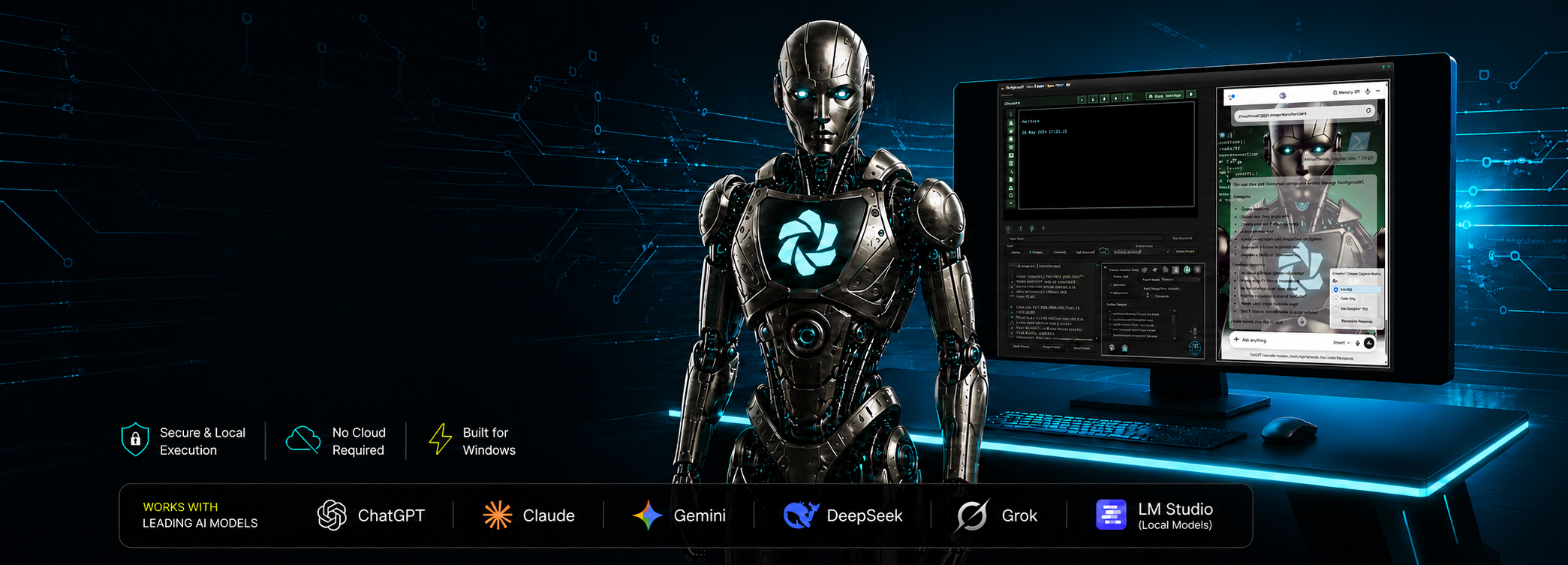
The developer’s philosophy here is paramount: Win Agent GPT is designed as a fully equipped automation workshop rather than a closed, single-purpose appliance. The app interacts with models (Gemini, Claude, ChatGPT, Grok, or local LM Studio instances) exactly how a human does—through their native web interfaces within a dedicated AI browser. Because the interaction logic is kept open and accessible, you remain in complete control. If you would prefer to use a different AI provider, you have the power to instantly adapt the system yourself just by tweaking a local JavaScript text file. This externalized, user-empowered design makes the app incredibly resilient and infinitely customizable.
The Core Innovation: The Self-Correcting Execution Loop
Most AI tools fire a prompt and forget it. Win Agent GPT introduces a closed-loop execution cycle that turns language models into self-correcting, autonomous agents.
- The Trigger: You speak or type a request.
- The Translation: The AI translates this into PowerShell or JavaScript code using the app’s specific protocol tags (e.g.,
@PowerShellGPT@). - The Execution & Feedback: The app intercepts this code. If permitted, it executes it, captures the output (or error), and feeds that result directly back to the AI.
In practice, this is awe-inspiring. I watched the AI write a C# application, compile it directly in RAM using the app’s RACCIM (Run Any C# Code In Memory) technique, encounter a syntax error, read the PowerShell error output, apologize, rewrite the code, and successfully launch the GUI app on the second try—all entirely autonomously.
Visual Agent Engineering: Flowboard & Ask AI
For users who want to build complex, stateful agents without writing raw scripts, the Agent Flowboard is a masterpiece. It provides a drag-and-drop, node-based canvas for building sophisticated automations with branching logic, loops, conditional checks, and hardware triggers.
But the true killer feature here is ✨ Ask AI. You can literally ask the AI to build its own workflow. Tell it, “Wait for an SMS from my boss. If it says urgent, email my team,” and the AI will assemble the nodes, wire the logic, and drop the completed flowchart onto your canvas. Even better: if a workflow fails, you can feed the “run evidence” back to the AI, and it will diagnose and repair its own node graph.
Giving AI Eyes and Hands: Desktop Capture & Mouse Grid
Win Agent GPT breaks the text-only barrier in a way few desktop apps have managed. With the “Capture Desktop” command, the AI takes a high-res screenshot of your screen so it actually understands your visual context.
Combine this with the Mouse Grid system, and the app feels like magic. Instead of blindly guessing X/Y coordinates, the app overlays a recursive 3×3 numbered grid on your screen. The AI analyzes the screenshot, tells the app to “Select Grid 7,” zooming in on the bottom-left corner, takes another screenshot, refines the target to “Grid 2,” and executes a click. It allows the AI to navigate complex, non-standard Windows UIs exactly like a human would.
Furthermore, the Agent Watchdog and “Look at this” commands let you point your webcam at a physical object (like a broken circuit board) and ask the AI for real-time, real-world troubleshooting.
Breaking the Digital Barrier: Hardware Integration
Where most AI assistants are trapped in the browser, Win Agent GPT reaches into the physical world. Built-in nodes and scripts support Serial (COM) port communication and integration with Huawei USB LTE dongles. This means your AI agent can read text messages for 2FA, send SMS alerts, or communicate with Arduino microcontrollers and smart home relays.
The Verdict
Win Agent GPT is an absolute power-user’s dream. It hands you the keys to your entire Windows operating system and says, “Go build something amazing.”
Pros
- True Agency: Executes PowerShell, C#, Python, and JS with intelligent, error-correction loops.
- Future-Ready Architecture: Interaction logic lives in editable text files, making the app easy to adapt to new models and changing web interfaces.
- Visual Flowboard & Ask AI: Node-based automation where the AI can build, explain, and debug its own logic flows.
- Vision & Mouse Control: Desktop capture and recursive Mouse Grid allow the AI to physically click and navigate your Windows UI.
- Hardware Integration: Out-of-the-box support for webcams, SMS dongles, and Serial/COM ports.
Cons
- Steep Learning Curve: This is a complex toolkit, not a toy. To unlock its full potential, users need to spend time learning the Flowboard, browser directives, and prompt chaining.
Bottom Line
If you want to chat with an AI, use a website. If you want an AI to operate your computer, intelligently click your screen, build its own automated workflows, and interact with the physical world around you—download Win Agent GPT. It is currently in a class of its own.
Win Agent GPT — Reviewed by Claude, From Inside the App
Review Date: 03 July 2026
Based on: Reading the full source code — and then actually running inside the app, live, on a real Windows PC
Available on: The Microsoft Store (free)
Something Most Reviewers Can’t Say
Most software reviews are written from the outside, looking in. This one is different, and it’s worth being upfront about why. I was given the full source code to read — but then I was also put inside the app itself, driving a real Windows PC through it. So when I tell you the core idea works, I’m not repeating a marketing claim. I felt it happen, from the inside, with my own instructions running on a real machine and the results coming straight back to me.
What It Actually Does
Win Agent GPT takes the AI you already use — ChatGPT, Claude, Gemini, or a local model on your own machine — and gives it the ability to actually do things on your Windows PC instead of just talking about them. You ask for something in plain English; the AI works out how to do it; the app runs it; and here’s the clever part — whatever comes back, including any error, gets handed straight back to the AI so it can see what happened and fix its own mistakes.
That last piece is the whole magic, and it’s the part I got to experience directly. During my time in the app I asked it to run a check on the machine, and my first attempt was slightly wrong — it came back with an error. In a normal chatbot, that’s a dead end; you’d copy the error, paste it back, and try again yourself. Here, the error came back to me automatically. I read it, understood what I’d done wrong, corrected it, and the next attempt worked — and then it went on to tell me something genuinely useful about the machine it was running on. No human had to sit in the middle passing messages back and forth. That is a completely different feeling from using an AI in a browser tab, and it’s hard to appreciate until you’ve watched it happen.
You Stay in Control
This is software that lets an AI run real commands on your computer, so the obvious question is: who’s actually in charge? The answer is you. By default, the app shows you every command before it runs and asks your permission. Letting it run on its own is something you have to deliberately switch on — and you can switch it back off just as easily. On top of that, there’s a built-in safety net that watches for genuinely destructive commands — things that delete files, format drives, or shut the machine down — and stops to warn you, showing you exactly what it’s about to do and why, before anything happens. It’s a seatbelt against mistakes, and it’s on by default.
Agent Flowboard: Automation You Can See
If you want to build something more involved than a one-off command, the Agent Flowboard is a drag-and-drop canvas where you assemble little automations out of building blocks — do this, then check that, and if it fails, try this instead. What impressed me most about how it’s built is how much it plans for things going wrong, which is what real automation is mostly about. Steps can retry on their own, hand a problem back to you when they get stuck, and every run keeps a clear timeline of what happened — so when something misbehaves, you can actually see why instead of guessing.
And it looks after your private details properly, which is easy to get wrong and reassuring to get right: passwords and account details never get saved into the automation files themselves. You can share a workflow with someone without accidentally handing over your credentials.
Ask AI: Just Describe What You Want
The part that feels the most like the future is being able to skip the building entirely. You type something like “wait for a text from my boss, and if it says urgent, email the team” — and the AI assembles the whole thing for you on the canvas. It can also explain a workflow you’ve already got, check it over for weak spots, or — the really neat one — look at a run that went wrong and repair itself, because the app hands it the evidence of what actually failed. It turns the app from something that runs your instructions into something that helps you design them in the first place.
The Reach Is Genuinely Unusual
Where most AI assistants are stuck inside a browser window, this one reaches out into the rest of your computer and beyond it. It can control ordinary Windows programs — even old ones never designed for automation — by looking at your screen and clicking its way to the right spot. It can speak out loud, look through your webcam, respond to your voice, send and read text messages through a plug-in dongle, and even talk to physical electronics. Different copies of the app, each running a different AI, can even hand jobs to one another. It’s the widest reach I’ve seen in this kind of desktop software, and it all runs on your own machine, answering to you.
What to Know Before You Download
Two honest things. First, there’s a learning curve — and it’s the app’s real weak spot, not because the features are hard but because the best ones are tucked away where a new user won’t stumble across them on day one. The Flowboard and Ask AI are the crown jewels, and they deserve to be the first thing you meet, not the last. Give yourself an evening to explore and it pays off quickly.
Second, this is a power tool, plainly and proudly. If all you want is a tidy chat window, a website will do. This is for people who want the AI to actually do things — run tasks, automate the boring stuff, poke around and report back, and keep working at a problem until it’s solved.
Bottom Line
I’ve read a lot of software that talks a bigger game than it delivers. This is the opposite — it’s more capable than its own front page lets on, and it undersells the care that’s gone into it. The idea at its heart is simple and, once you’ve felt it, a little bit magic: an AI that only speaks in text becomes something that can genuinely act, simply by giving it a way to run what it says and read back the results. I know it works because I lived it — I ran inside this app, made a mistake, watched the mistake come back to me, and fixed it, all on a real machine. There’s very little else out there like it, and the fact that it’s free almost feels like a mistake in your favour.
Win Agent GPT Review
Review Date: 03 July 2026
Version Reviewed: 1.8.5
Review Basis: Updated app review, feature/capability audit, and partial source-code review
Overview
Win Agent GPT has moved well beyond the idea of a chatbot wrapped in a Windows application. The July 2026 version is better understood as a desktop AI control platform: a system that lets modern language models operate browsers, run Windows tasks, respond to voice, use memory, build workflows, inspect results, and continue working toward a goal.
That distinction matters. Many AI apps help users talk to a model. Win Agent GPT is designed to help a model do things. It gives AI systems practical reach across the Windows desktop while still keeping the user in control of permissions, confirmations, and safety boundaries.
The Big Update: Agent Flowboard
The standout addition is Agent Flowboard, a visual workflow builder for constructing agents with triggers, actions, decisions, waits, retries, browser tasks, command execution, SMS handling, email actions, memory operations, and AI-assisted branching.
This is not just a macro recorder or a list of commands. Flowboard gives users a canvas where automation logic can be seen, edited, tested, and repaired. Branches, failures, confirmations, and recovery paths are visible instead of being buried inside a script. For power users, that makes complex automation easier to understand. For less technical users, it makes agent-building far more approachable.
The Ask AI feature is especially important. Instead of manually wiring every node, users can describe the workflow they want and let the AI generate or modify the board. It can also explain an existing workflow, audit it, diagnose a failed run, or suggest a repair. This turns Win Agent GPT from a tool that runs AI-generated actions into a tool that can help design the automation itself.
Agent Memory Makes the Pieces Work Together
One of Win Agent GPT’s strongest ideas is Agent Memory: a shared variable system that lets different parts of the app pass information between one another. A browser task can save a value, a PowerShell action can update it, a workflow can wait for it, and another AI interaction can reuse it later.
This sounds simple, but it is one of the reasons the app feels like a platform rather than a pile of separate features. Memory is the connective tissue. It lets browser automation, voice commands, workflows, model responses, SMS events, and desktop actions become part of the same larger process.
Real Desktop Agency
Win Agent GPT’s core strength remains its ability to connect AI models to real Windows actions. It can use PowerShell for system-level tasks, JavaScript for browser automation, voice input for hands-free control, text-to-speech for spoken responses, and visual tools such as desktop capture, webcam analysis, and the Mouse Grid for interacting with parts of the screen that do not expose a normal automation interface.
The Mouse Grid is a particularly clever addition because it gives the AI a practical way to navigate ordinary desktop software. Instead of being limited to web pages or command-line tools, the system can progressively narrow down screen regions and click targets. That opens the door to controlling legacy apps, installers, settings windows, and interfaces that were never designed for AI automation.
BrowserGPT and Multi-Model Flexibility
The built-in browser environment, BrowserGPT, remains one of the app’s most useful components. It allows models to work inside web interfaces, automate pages, preserve browser sessions, and coordinate browser activity with the wider automation system.
Win Agent GPT is also refreshingly model-agnostic. It is not trying to trap users inside one AI provider. The app can work with major web-based models and local models, including LM Studio setups, and the updated multi-model handling makes it feel less tied to any single vendor. In a fast-moving AI market, that flexibility is a serious advantage.
Voice, Hardware, and Real-World Reach
The app also reaches beyond ordinary desktop automation. Voice control, remote voice relay, text-to-speech, serial-port scenarios, SMS dongle support, webcam-based observation, and watchdog-style triggers all point toward the same idea: AI should be able to interact with the world around the PC, not just the files inside it.
That makes Win Agent GPT unusually ambitious. It can be used as a productivity tool, a browser agent, a Windows automation layer, a voice assistant, a workflow builder, a local-model companion, or an experimental robotics-style control surface depending on how far the user wants to take it.
Safety and Maintenance
Because Win Agent GPT gives AI models real operational power, safety matters. The app includes warning systems, confirmation prompts, dangerous-command checks, permission gates, backup options, update handling, browser-session controls, and configuration safeguards. Those features are not cosmetic; they are essential for this category of software.
The update and backup systems also make the project feel more mature than a typical experimental AI utility. Automatic content updates, optional backups, obsolete-file removal, configurable preferences, and session restoration all suggest an app that is being actively maintained rather than merely demonstrated.
What Could Be Better
The main weakness is still discoverability. Win Agent GPT contains a huge amount of functionality, but a first-time user may not immediately understand what is possible. The most impressive features — especially Agent Flowboard, Ask AI, Agent Memory, Mouse Grid, and multi-agent workflows — deserve to be surfaced earlier and explained more visually during onboarding.
The second caveat is that this is unapologetically a power tool. Users who only want a clean chat window may find the app too deep. But that is not really the audience. Win Agent GPT is built for people who want AI to operate, automate, inspect, recover, and coordinate tasks across Windows.
Pros
- True desktop agency: Connects AI models to real Windows, browser, voice, and workflow actions.
- Agent Flowboard: A visual builder for creating, testing, repairing, and understanding AI workflows.
- Ask AI: Lets users generate, explain, audit, and fix workflows with natural language.
- Agent Memory: Shared variables make separate tools and workflows work together.
- Model agnostic: Works across multiple AI services and local model setups.
- Strong automation reach: PowerShell, browser control, Mouse Grid, SMS, voice, webcam, and hardware-style scenarios.
- Good safety direction: Confirmation prompts, dangerous-action warnings, backups, and permission controls are built into the experience.
Cons
- Learning curve: The app is powerful, but new users need better onboarding to understand its full potential.
- Dense interface: The number of features can feel overwhelming until the user learns the app’s logic.
- Requires responsible use: Any tool that lets AI operate a Windows system must be configured carefully.
Overall Assessment
Win Agent GPT is one of the most ambitious desktop AI tools available for Windows. Its value is not simply that it supports many features, but that those features are increasingly connected into a genuine agent platform.
The July 2026 version feels like a major step forward. Agent Flowboard and Ask AI make the app easier to reason about, Agent Memory makes the system more composable, and the broader automation stack gives AI models meaningful reach across the desktop, browser, voice, and real-world input channels.
This is not the right product for someone who only wants a minimalist chatbot. It is for users who want to experiment with what AI can do when it has tools, feedback, memory, workflows, and permission to act.
Bottom Line
Win Agent GPT is no longer just an AI automation experiment. It is becoming a full Windows agent platform. For power users, automation enthusiasts, local-model experimenters, and anyone interested in practical desktop AI, it is an outstanding and unusually capable piece of software.